Troubleshooting done Motorola style!

The packets don’t lie. Any CWAP will tell you that. They’re the foundation of what we do in networking and one of the most troublesome things to get your hands on at times. One of the most significant challenges is that you rarely get to capture the ‘radio view’ of your packets. It’s usually a conversation about getting close enough to a radio, or putting an adapter or radio into promiscuous or sniffer mode and listening to what you can hear – this has always seemed somewhat ‘best effort’ to me since there’s always a small chance you’re not listening at the time that a packet is on the air. Wouldn’t it be much better to just have a copy of the packets that hit your Access Points radio interface just copied off somewhere for you to explore at your leisure? That way you have an honest view of what the actual infrastructure is either sending or receiving. Well, that’s exactly what Motorola allows us to do with a superbly easy to use, yet very powerful feature of their Wi-NG 5 Operating System. Once you have a radio up in Wi-NG 5, you can telnet/SSH to the Access Point and use the service pktcap command to capture your packets – while servicing clients!

In order to explore this feature, we need to know what we want to capture (1 client, all packets, arp traffic, etc), how much we want to capture (x number of packets), what direction we want to capture the packets (inbound, outbound, both), and where we want to save the packets to (terminal buffer to look at them, tftp, tzsp, etc). There are far more features that I’m glossing over for the sake of brevity, but this short look should be enough to get even the newest person up to speed! In my example, I want to capture the next 100 packets of all traffic that comes into all radios and I want to save it off to a tftp server.

ap6521-E3BEF4#service pktcap on radio all count 100 direction any write tftp://192.168.3.10/motorola.cap 
Capturing up to 100 packets. Use Ctrl-C to abort.
100
ap6521-E3BEF4#

Let’s dissect this command:

service pktcap on radio all

This tells the Access Point to start a packet capture on all radio interfaces and is the first component of ‘where to capture’ the packets from. You would usually pick a singular radio by using the numeric index (1 through 1024) or just leave it at all for seeing all packets in the air.

count 100

This tells the packet capture service to capture the next 100 packets and can be 1 to 1000000 packets.

direction any

Tells the packet capture service to capture inbound, outbound, or packets in both direction (coming into or leaving the radio).

write tftp://192.168.3.10/motorola.cap

Tells the packet capture service to copy the capture file out to my tftp server (192.168.3.10 in this case – expect yours to be different) and what to name the file (motorola.cap in this case). You can followup this command with a filter keyword to select type of traffic, src, dst, and a whole host of other options to pare down your capture.

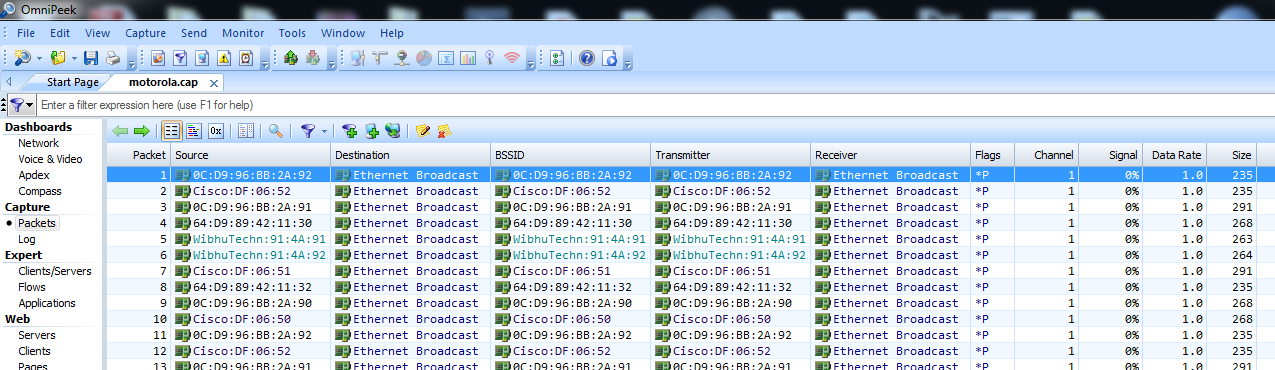
Once you’ve captured the file, get it off of your tftp server in whatever way pleases you best (I run samba on my tftp server and can do a direct network neighborhood browse for it) and double click it. If you have wireshark or OmniPeek installed, it should open up into the default view for the packet analyzer and start showing you packets!

Screen Shot 2013-08-27 at 4.28.02 PM

Screen Shot 2013-08-27 at 4.28.09 PM

In all, a very elegant way to get packets out of your Access Points. These are the packets of your clients and the ability to capture them live off of your infrastructure (similar to a wired span port) is an invaluable feature when troubleshooting.

Full disclosure: As a delegate for Wireless Field Day 4 and 5, Motorola gave me an AP6521 and an AP6522 without commitment to comment or blog. If you want to know more about the Motorola wireless portfolio, you should follow @MotWireless on twitter!

The Unstoppable MetaGeek – now with CleanAir!

Rarely does such an organization come around that expresses it’s agility and prowess with as much regularity as MetaGeek. The most recently of which is their ability to use Chanalyzer Pro (their premium Spectrum Analyzer software) to talk to the Cognio chipset in a Cisco CleanAir Access Point. PC based Spectrum Analyzers have had a sordid history to say the least. Way back when, Cognio made what you would call ‘the best of the best’ PC based Spectrum Analyzer. This took the place of many of the bulkier, more expensive Spectrum Analyzers and proved to the world that a) it was important to get Layer 1 visibility for enterprise WLANs and b) that they could make it affordable for most services based partners. Everyone OEM’d the Cognio analyzer, AirMagnet, Fluke, and WildPackets. Along came Cisco. They purchased Cognio, killed off all of the OEM agreements, rolled the hardware into their Access Points, and started selling the Cognio product with the Cisco name on it (Cisco Spectrum Expert). Unfortunately, they didn’t do much with the CardBus product and let the non-AP components stale. The aging interface form factor left quite a few holes in the market and along came a few people here and there to make it all shake out like this (generally):

  • Cisco Spectrum Expert: Highest resolution, CleanAir AP and CardBus form factor, Cognio based
  • AirMagnet Spectrum XT: Middle resolution, USB form factor, bandspeed based
  • AP based Spectrum Analyzers: Low resolution, integrated into many APs, Atheros based
  • MetaGeek Wi-Spy: Low resolution, USB form factor, keyboard controller based

Ryan and team over at MetaGeek did an excellent job of using very affordable components to give us an alternative to the aging CardBus adapter and the newer, more expensive AirMagnet adapter. They were an awesome product for the money but never really achieved huge market penetration due to the fact that the Cognio and bandspeed products still offered higher resolution. With the Cognio hardware all locked up in the Cisco Access Points, it seemed inevitable that we’d never have a good way to access it. Imagine our surprise when at this years Cisco Live event, MetaGeek was there – showing off their integration between Chanalyzer and the CleanAir Access Points! Ladies and Gentlemen, this is the *exact* same Cognio hardware, high resolution Spectrum Analyzer goodness that we all know and love from the old days. When I first heard about this, there was much trepidation about MetaGeek perhaps not being able to address the ‘full power’ of the Cognio (ahem, CleanAir) chip in its rawest form, but I’m here to tell you, when compared side by side with a legacy CardBus based Cognio adapter, the data is identical! The user interface is the updated, Chanalyzer interface with all of the modern enhancements they’ve made over the years with the WiSpy products, but you’re using the high-fidelity data that Cognio gives us. Here’s how it works:

You can connect to a CleanAir AP that is autonomous or lightweight (registered to a WLC) and it can be either servicing clients or in dedicated ‘SE-Connect’ Mode. You get the highest resolution, widest image when it’s in this last mode so let’s start there. Log into your controller, select your AP from the wireless tab and change it from ‘local’ to ‘SE-Connect’. Click Apply and let the AP reboot and join back to the WLC.

Screen Shot 2013-08-12 at 9.02.03 PM

Once it’s joined back, select the AP again and you’ll find both the IP address of the AP and something called the NSI key:

Screen Shot 2013-08-12 at 9.08.06 PM

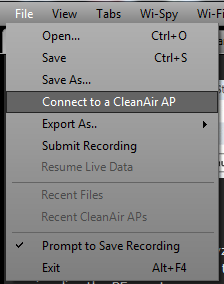
Lauch Chanalyzer Pro with CleanAir and goto the File Menu. Select the intuitive ‘Connect to a CleanAir AP:

Screen Shot 2013-08-12 at 9.12.25 PM

Once you do that, enter the values from the AP page that you previously saw including the IP address, NSI key and a friendly name for this AP:

Screen Shot 2013-08-12 at 9.13.07 PM

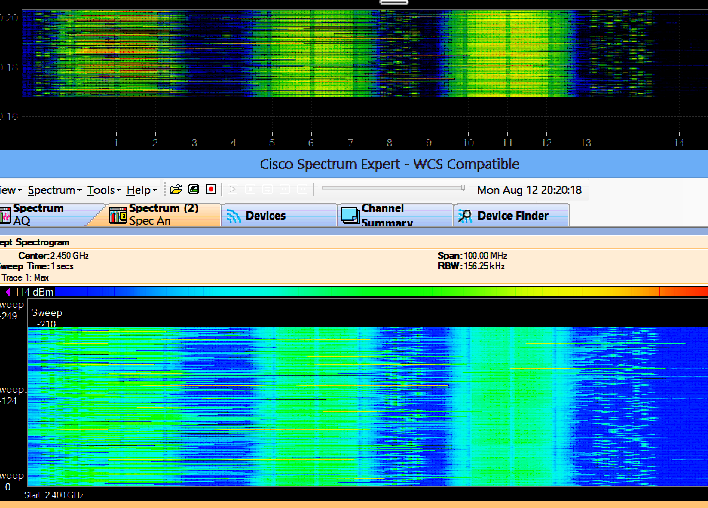
Once you’ve done that, mash the Connect button and you’ll start to see the familiar Chanalyzer Pro interface with all of the wonderful resolution we all grew so fond of all those years ago! For reference, I ran Chanalyzer Pro with CleanAir on the same machine at the same time as a Cisco Spectrum Expert instance (using the CardBus adapter). Aside from the waterfall flowing up in the Cisco product, and down in the Chanalyzer product, you’ll see striking similarities in the respective waterfall views:

Screen Shot 2013-08-12 at 9.21.24 PM

Screen Shot 2013-08-12 at 9.21.41 PM

and at the same time, getting all of the other awesome details out of the Cognio SaGE like interferer auto-classification and AirQuality Index. Proving once again that MetaGeek are the top kids on the block when it comes to innovation and integration – but don’t take my word for it, head on over to MetaGeek, grab yourself a copy and give it a spin!

Full Disclosure: As an delegate of the Wireless Field Day event, I was given a copy of Chanalyzer Pro with CleanAir to play with without promise or commitment to write anything – much less something positive. 🙂 MetaGeek is a regular supporter of the Tech Field day events and generally makes awesome products and is regularly engaged in Social Media – you should go follow them at @metageek and catch up on the NoStringsAttached Show where Blake Krone and I also talk with MetaGeek about Chanalyzer with CleanAir!

First look: Cisco 802.11ac module for the AP3600

Last year Cisco launched their 3rd modular Access Point, the 3602 featuring 3 Spatial Stream 802.11n, dual radios, and CleanAir support. One of the much touted features was the introduction of a ‘future-use’ modular slot across the back of the Access Point (now called Adaptive Radio Modules ). This was to future proof your investment and at the time, Cisco took a lot of heat for this modular future proof approach to investment protection. Sometime after the Access Point was launched, Cisco announced that there would be at least two modules available, one being the WSSI module (for full time monitoring of off channel events) and the 802.11ac module (to support the yet-to-be ratified 802.11ac standard). I’ve gotten my hands on an 802.11ac module and here is what I know:

a) It’s easy to install:

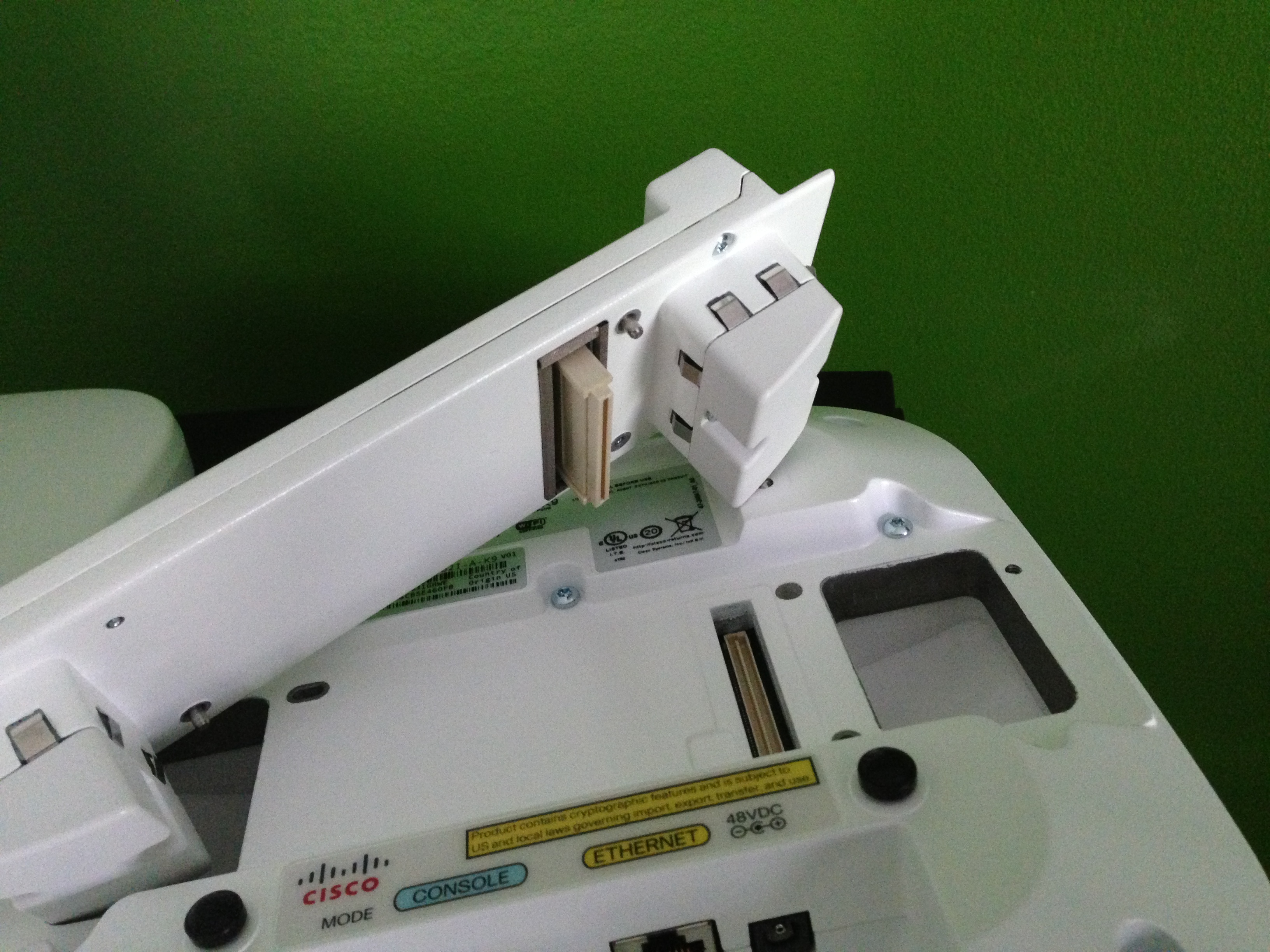
With two thumb screws on the module itself, you simply grab the AP off of the ceiling tile, unplug the ethernet cable, flip it over, remove a piece of tape to expose the connector, place the module on the back, screw down the thumb screws, re-attach the network cable, and rehang the AP.

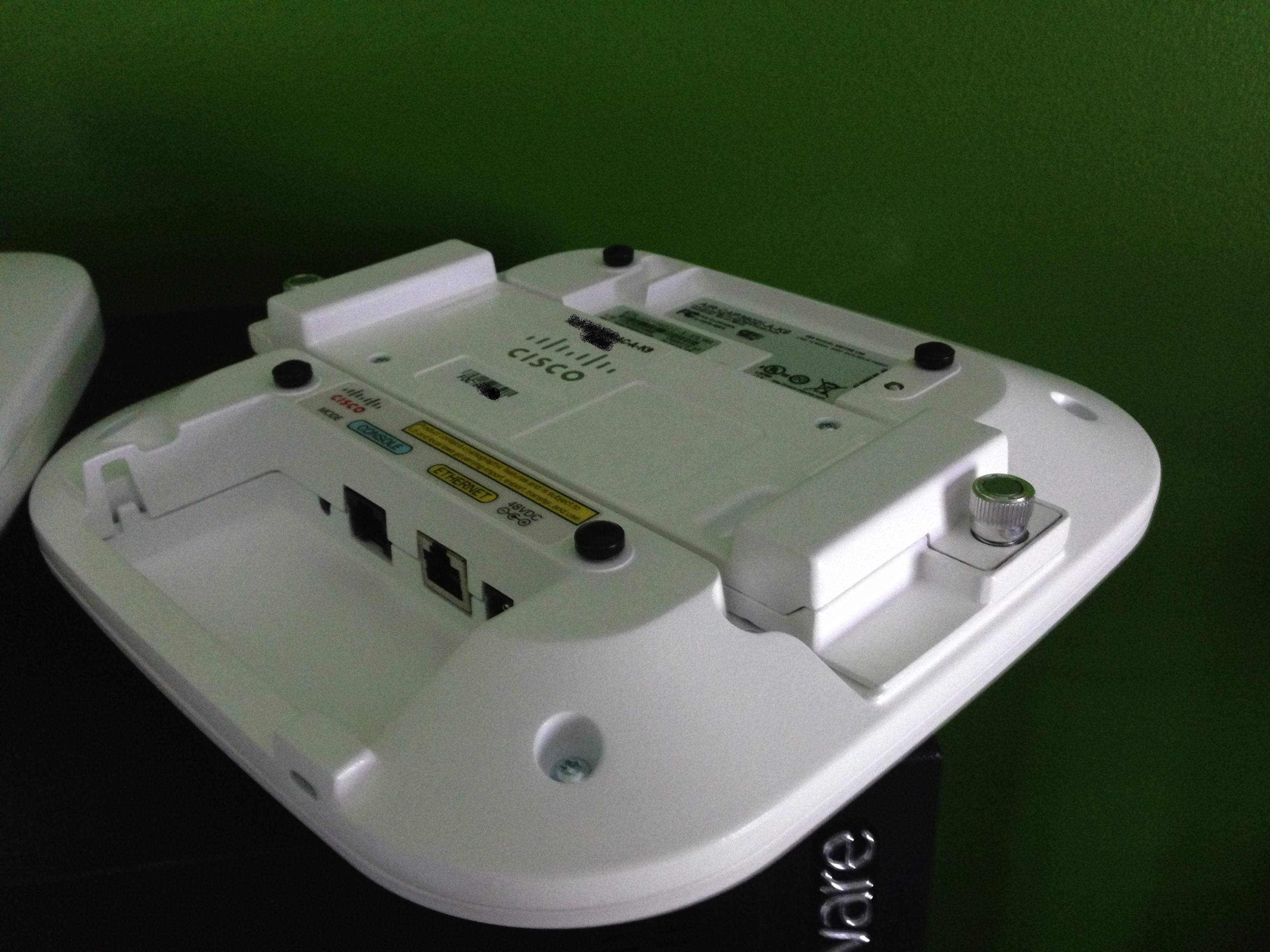
802.11ac module

802.11ac module

802.11ac module installed

802.11ac module installed

b) It can require up to 20 Watts*:

#show power inline gigabitEthernet 0/2
Interface Admin  Oper       Power   Device              Class Max
                            (Watts)                            
--------- ------ ---------- ------- ------------------- ----- ----
Gi0/2     auto   on         20.0    AIR-CAP3602I-A-K9   4     30.0 

Interface  AdminPowerMax   AdminConsumption    
             (Watts)           (Watts)           
---------- --------------- --------------------  

Gi0/2                 30.0                 30.0
#show power inline gigabitEthernet 0/2 detail 
 Interface: Gi0/2
 Inline Power Mode: auto
 Operational status: on
 Device Detected: no
 Device Type: cisco AIR-CAP3602I-
 IEEE Class: 4
 Discovery mechanism used/configured: Unknown
 Police: off

 Power Allocated 
 Admin Value: 30.0
 Power drawn from the source: 20.0
 Power available to the device: 20.0

 Actual consumption
 Measured at the port: 8.6
 Maximum Power drawn by the device since powered on: 10.2

 Absent Counter: 0
 Over Current Counter: 0
 Short Current Counter: 0
 Invalid Signature Counter: 0
 Power Denied Counter: 0

 Power Negotiation Used: CDP
 LLDP Power Negotiation --Sent to PD--      --Rcvd from PD--
   Power Type:          -                    -
   Power Source:        -                    -
   Power Priority:      -                    -
   Requested Power(W):  -                    -
   Allocated Power(W):  -                    -

c) It ‘just works’:

The 802.11ac module shows up as you’d expect – as a ‘slot 2 radio’ and you can Admin Enable and Disable it. Aside from that, it takes all of it’s RF specific configuration from it’s parent radio – operating in tandem with the integrated 5GHz radio that services your 5GHz 802.11n clients. As with all hardware updates, you’ll need to update your WLC code to a version that supports the module but this is only mentioned as a ‘well duh’ requirement. 🙂

Since the module is adding a radio specifically to support 802.11ac clients, it increases the total client capacity of the AP3600 to a whopping 450 (200 for 802.11n 2.4GHz, 200 for 802.11n 5GHz, and 50 for 802.11ac)! While the jury is out about it being a good idea to try and support 450 clients on a single AP, the capacity numbers are listed for the inevitable vendor-bashing that is sure to ensue!

d) Clients will be the next big challenge:

As with the transition from 802.11b to 802.11g, then to 802.11n, the transition to 802.11ac will derive most of it’s pain from client adapters. Driver updates, marginal modulation benefits at distance, etc. The biggest benefit from 802.11ac will be the cleaner frequency requirement (5GHz) but poor roaming choices from clients will most certainly be the biggest pain point we all grapple with.

400Mbps

400Mbps

FAQ:

*Does the module require more than 15.4W PoE?

No! The module can be operated at *full* 802.11ac performance in class 3 power by disabling the 2.4GHz radio on the AP. This is the only solution on the market that offers *full* 802.11ac performance in Class 3 power. This means that you can deploy 802.11ac today even without switch upgrades! Here is a show power from a AP and module servicing 802.11ac clients:

#show power inline gi0/2
Interface Admin  Oper       Power   Device              Class Max
                            (Watts)                            
--------- ------ ---------- ------- ------------------- ----- ----
Gi0/2     static on         15.4    AIR-CAP3602I-A-K9   4     15.4 

Interface  AdminPowerMax   AdminConsumption    
             (Watts)           (Watts)           
---------- --------------- --------------------  

Gi0/2                 15.4                 15.4

Is this Cisco’s 802.11ac Access Point?

No! This is a 3 spatial stream 802.11n Access Point with an 802.11ac module. While I cannot comment on future or unannounced products, it stands to reason that Cisco will continue to evolve products and announce those products when they’re ready. It’s my opinion that a fully fledged 802.11ac Access Point will be announced at some point.

Can you tell me more about a dedicated 802.11ac Access Point from Cisco?

No. I have no disclosable information on an 802.11ac Access Point from Cisco.

How much does the module cost?

The list price for the module is around $500. Engage your Cisco Account Manager and Partner team for your discounted pricing (and don’t pay list). 🙂

What other modules are there for the AP3600?

There is a small cell 3G module available.

Will there be future modular Access Points from Cisco that support these modules?

I have no disclosable information on an unannounced products from Cisco.

Is this the end? What about speeds and feeds? What about a take apart so we can see what’s inside?

There will be a followup post. What would you like to see?

MetaGeek inSSIDer for Office hands on

The unstoppable MetaGeek.

Talk about a company that knows their target audience! MetaGeek proves once again that they can pull off simple to use tools that incorporate legitimate (and sometimes difficult to get) data into a simple to use interface, targeted at a specific type of user. In this instance, MetaGeek has launched their inSSIDer for Office product – intended to provide the small office user unprecedented insight into their RF to help them make intelligent decisions about their wireless infrastructure.

The first thing you should know about MetaGeek is that they specialize in visualizing spectrum analysis data. This is the geek-out squiggly lines that your favorite wifi engineer loves to gaze at for hours on end (okay, maybe not – but you get the point). In inSSIDer for Office, they incorporate some pretty significant RF spectrum analysis data with a no-nonsense approach to telling what you need to know. This product is targeted squarely at the office user (and is named aptly). If you run a small office with a couple of wireless Access Points, you need this. inSSIDer for Office couples MetaGeeks WiSpy-Mini product in an easy to use form factor with your laptops existing wifi adapter to tell you not only what wireless networks are around you, but what the raw RF behind the scenes is doing. If you are experiencing interference from a microwave oven – or other wifi interferrer, this will show that quite nicely. Basically, if you’ve tried to use the netstumbler type products (even the free MetaGeek inSSIDer for home) but are looking for a low-cost ‘step up’ – this is it.
With an easy to use user interface, the main page of the application is broken up into four sections that logically flow from left to right starting with a good ‘Learn tab’ that gives you a good overview into what you’re about to see.

ImageFollowing through the top tabs into Networks, Channels, and Analyze basically walks even the most novice user logically through visually displaying what they have in the air around them, what’s free/used, and gives you a really strong understanding about what’s going on in the non-802.11 world without needing a degree in understanding RF.

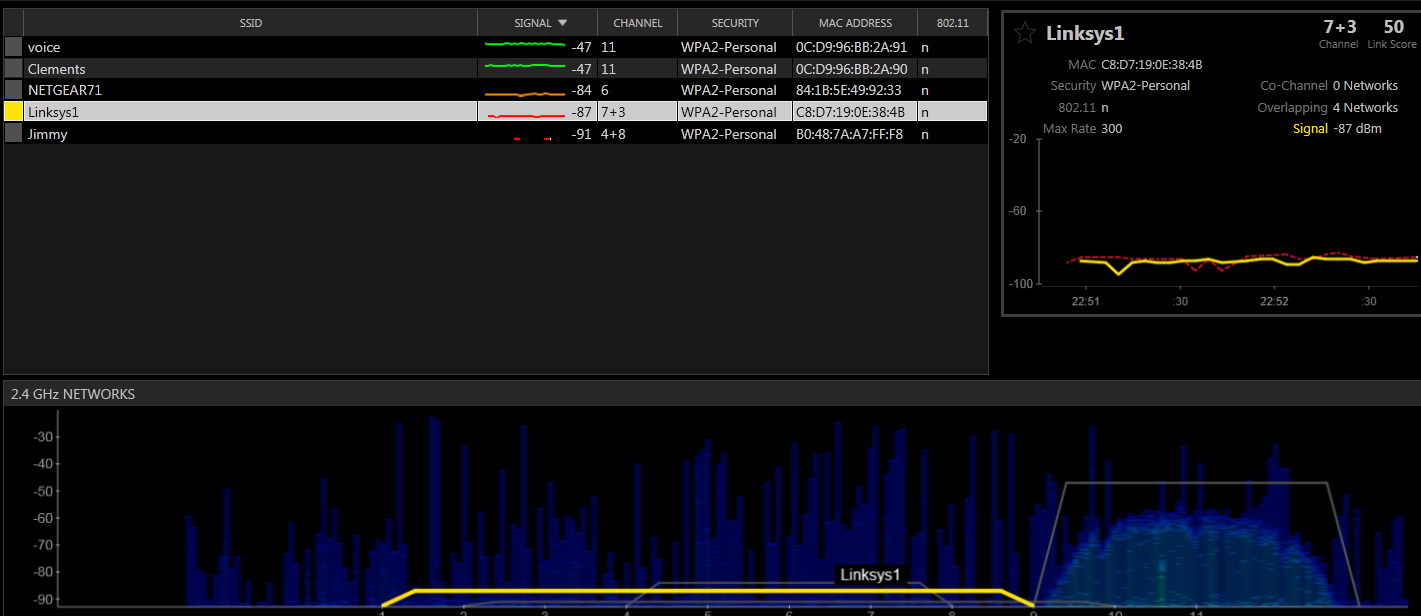
Once you’ve launched the application, the Networks tab gives you a wealth of information including a spectral mask view in the bottom of the page as well as a list of SSIDs in range of your adapter.

Image

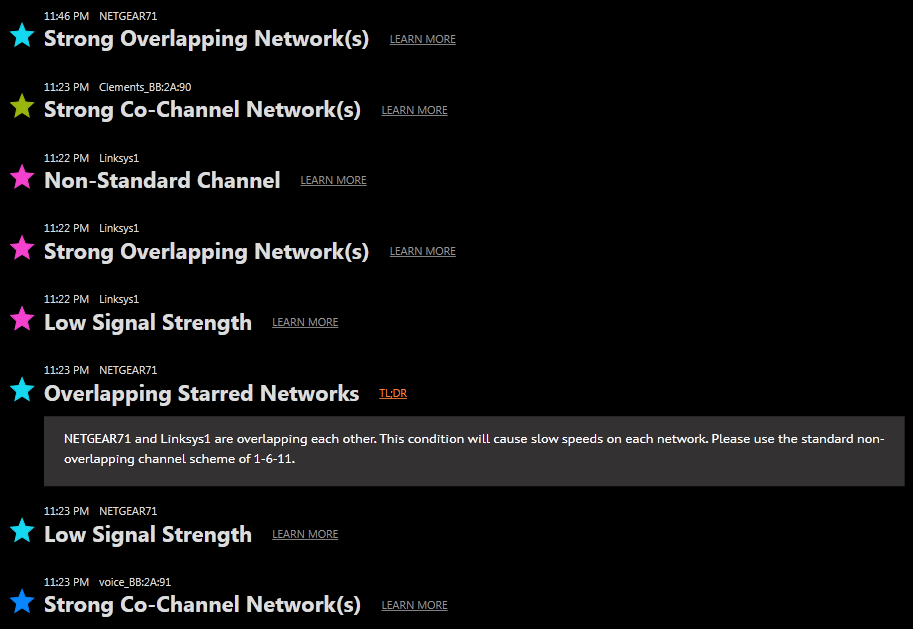
The first thing you should do is select your network from the list by moving up and down using the arrow keys then pressing the intuitive ‘s’ key for select. Once you’ve ‘starred’ your network(s), pop on over to the Channels view for a good Green/Yellow/Red view of your environment, then onto Analyze for an easy to read and understand ‘observed issues’ with your selected networks – including some no-nonsense advice for you such as, “Overlapping Starred Network: This condition will cause slow speeds on each network. Please use the standard non-overlapping channel scheme of 1-6-11.”. The application is deceptively easy to use but don’t let it fool you.

Image

The fine folks over at MetaGeek once again have taken some very complex data, well beyond what you can get with the free tools, and incorporated it into an easy to use, accurate, and cost-effective tool for the small office environment. Any semi-tech savvy user, office admin, or support-geek will find that this pays for itself in very short order.

Full disclosure: I met up with the MetaGeek folks over at Interop recently where I spoke with them about inSSIDer for Office. They gave me a copy of the product to review without obligation. MetaGeek regularly supports such events as the Tech Field Day events and make products that even the most seasoned WiFi expert should have in their toolbag. I can’t wait to see what they come out with next!

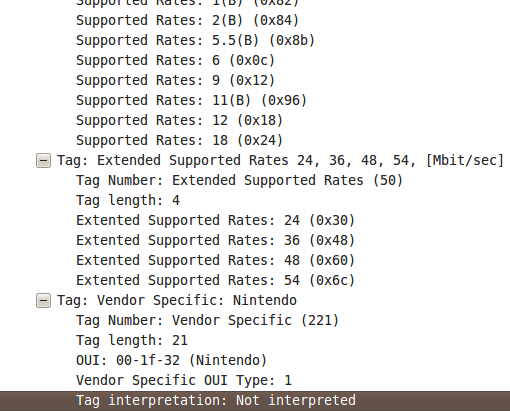
Tag: Vendor Specific: Nintendo

Yes, you read that right – Nintendo. It’s no secret that I own and use Nintendo equipment (now the source of two blogs!). What did surprise me is that during the course of some routine attacking of my home network (doesn’t everyone?) I happened across some very interesting Probe requests showing up:

Yes – that is a Probe Request that is asking for the SSID “Nintendo_3DS_continuous_scan_000”. This is particularly interesting since a) I hadn’t powered on my Nintendo 3DS in about 3 months (thank you CCNP) until last night and b) when I was done playing with it, I just closed the lid thinking it would just go quietly off into standby. Clearly that wasn’t the case so I hunted around for where I dropped it last and opened the lid. To my surprise, the Probe Requests stopped! Closed the lid and in about 10 seconds, they started again! Clearly something is going on here so I dug a little further… Inspecting the Probe Request reveals some interesting tidbits – down towards the bottom is “Vendor Specific: Nintendo”:

Further inspection of the ‘Tag interpretation: Not interpreted” reveals a good chunk of interesting looking data:

After a bit of digging, I stumbled across the data I was looking for! The SSIDs being probed for are part of Nintendo’s StreetPass service that allows ‘sleeping 3DSs’ to share data such as Mii Plaza data and other games that are ‘StreetPass enabled’. The fine folks over at 3dbrew spell this out quite nicely – The first byte of this (01) is the Vendor Specific OUI Type. The next byte (11) is likely Protocol Identification. The next byte (05) in this example is the length of the StreetPass services being advertised. The next 5 bytes (length from the previous byte) in this case are 00 05 40 00 30 are the actual services being advertised – in this case, Super Mario 3D Land. The next two bytes (f0 08) seem to be a marker of the end of the services. Everything after that appears to be my unique StreetPass ID.

Here is another capture showing two sets of StreetPass services:

The same beginning (01 11 11) followed by a StreetPass services length (0a which is twice as long as 05 – someone check my math on that!). This means that there should be two StreetPass services advertised – each 5 bytes long. The next 5 bytes are 00 03 74 00 00 (which I believe belong to Lego Pirates of the Caribbean) and 00 05 40 00 30 (which match my Super Mario 3D Land example above!) and the closing bytes f0 08 then my StreetPass ID.

Here is another capture showing a single StreetPass service identified by the 3rd highlighted byte (05) and the following ID of 00 02 08 00 00. This particular StreetPass service is the Mii Plaza – basically ad-hoc twitter and IRC with goofy avatars all rolled into one!

Okay – 1 more then, I’ll stop. 🙂

Here we see the same intro (01 11) followed by 0a which means we have 10 byes of services (or two services). The first one (00 02 08 00 00) we’ve seen before – it’s Mii Plaza. The second one (00 03 06 00 30) this time line up to Mario Kart 7 followed by our end of StreetPass services (f0 08) and my StreetPass ID.

If you have a Nintendo 3DS and want to see what StreetPass services you (or your children) have enabled, goto System Settings -> Data Management -> StreetPass Management. You should see a matching number of StreetPass services to the StreetPass Service Length field in your packet capture. Decipher yours out and let me know which ones you have!

-Sam

Post script: I now understand why this thing eats batteries in ‘standby’. 🙂

Aruba wants you to stop buying the AP134-135. 3rd times the charm?

Earlier this month, Scott Calzia, Director, Product Marketing at Aruba posted an article deriding the announcement of an 802.11ac module from Cisco for their flagship Access Point – the 3602. I took umbrage at the article which lead to the following posts and replies between myself and Aruba Product Marketing Manager, Ozer at Aruba: My first postOzers replyMy next replyHis next reply, and now this post.

Before going any further, I certainly acknowledge that this threaded saga of post-reply-post-reply is a difficult one to follow and I believe that further discussion will likely take place on the No Strings Attached Show. There is a good deal of technical discussion and rabbit trailing in the threads between Oz and myself and I some of them are quite tangential but I’m trying to keep topics centered around the original post topics. I welcome further discussion about performance & feature sets that are outside of the original post and if you’d like to have something addressed in further detail, please leave me a comment in the section below! Having said that, it’s hard to thank someone of Ozers caliber for continuing to stay engaged without sounding trite or insincere. I (and many of my readers that prefer offline comments) genuinely appreciate the dialogue and open discussion. Keeping each other honest with an above board, fun and engaging conversation is exactly the point of this.

Onto the meat!

Alright I am back for round 2… I hope this does not last until round 15 :) I gotta tell you I love the “ding-ding” opening! I am glad that we can keep the discussion fun, engaging instead of using anger and personal attacks… Thanks again for accepting my reply, glad to have the discussion going. BTW, you type fast!

Your comment to Aruba blog…
I am assuming it is a side effect of web changes yesterday (new navigation and converging 3 blog pages into 1) but I will check shortly.

Sounds good! It looks like my original post is still ‘awaiting moderation’ but I look forward to having it approved – Mine get auto-approved, pending spam filtration so I’d be interested in hearing from Scott as well!

Regarding 2400…
small typo as you can guess: meant to refer to 2500 series controllers.

Well, that’s what I was thinking Scott meant in his first post. This means that the corrected statement would be (in reference to controllers that support the 3600):

So if you have older 2500, 4000, WiSM or WCS, it is that time to write your Cisco tax check again.

Sadly, this statement is also false since the 2500 WLC does indeed support the 3600. As a side note, the WCS release notes call out support for the 3600 as well. I’ve been asking for some time about clarification of code support for the controllers and how that meshes with the WCS/3600 support, but it does state it and I presume that since WCS supports code release 7.1, Cisco can claim 3600 support. Yes this is slightly ambiguous and not 100% clear but as the Aruba statement sits, it’s incorrect. Cisco isn’t perfect (there, I said it) but, at minimum, checking the release notes is a) easy to do since they don’t change locations and b) should be a requirement before declaring something is incompatible.

Alright back to tech…

Regarding 1250 series AP (since many commented on it)…
Almost a year after 1250 series, 1140 series was announced. I am not claiming that the AP actually physically failed (it obviously worked just fine after you managed to install it) – it was no longer the right AP to install for many, unless you are installing APs in a warehouse or similar challenging environments. Cisco’s promise of “modular AP is the way to go” was no longer. 1140 had better form factor, better price, did not need external antennas, better PoE efficiency. There was almost no reason to install 1250 series in a classroom or a carpeted office space after 1140 series was released. During that timeframe Aruba’s AP-124/125 series won many deals against Cisco 1250 series (support for PoE and better form-factor were big technical reasons) when we get the chance to sit at the table. Market demanded something better than 1250 series.

Well, I don’t think Cisco ever declared that ‘modular was the way to go (forever and ever)’. We all know that manufacturing efficiencies can be achieved with highly integrated component and if you’ll recall, the IEEE ratified the 802.11n spec during that first year – that’s the reason the 1142 came out in short order. The 1252 was a modular goto-market product that addressed a specific need and was very successful at it. Don’t get caught comparing Apples to Oranges here though, the 1252 and the 1142 are not positioned as competitors and the 1252 was still positioned as the de-facto 802.11n Access Point for external antenna support and extended operating ranges well after the 1142 was launched (as you rightly stated). The 1262 is the Access Point that ultimately replaced the 1252, not the 1142. If you needed an Access Point with flexible antenna options that operated in an environment up to 131F, the 1252 was your man. Admittedly, you may not have been at the table for deployments like that since Aruba doesn’t play well in extreme environments (over 122F for the Aruba 120/130), but I was and I continued to sell the 1252 in significant quantities well past the launch of the 1142. I didn’t realize that defending the 1252 was going to be such a popular topic! I suppose it’s easy to mis-construe the past to those that didn’t live it first-hand, but there you have it.

Of course, there is a trend with Cisco’s modular APs – great marketing for Cisco, brings in more dollars. I am just not convinced that it is the right thing for the customer. My humble opinion…

And you’re close to the point here. Yes, it’s good marketing, but it also fills a need (not just Ciscos coffers). It’s easy to beat up on the dog in front declaring missteps or some other ‘lack of vision’ as a defensive strategy, but the 801.11ac module fills a need that we’re seeing more and more in RFP responses and as a growing concern among enterprises. It’s investment protection and people want this today.

Let’s double click on Cisco’s investment protection….

Note that 1st gen 11ac AP does not go above 3 spatial streams (instead of up to 8 defined per 11ac standard) and does not support multi-user MIMO (which is really beneficial for the upcoming 11ac capable smartphones and tablets as you know). My guess is 2nd gen 11ac APs will have up to max of 5 spatial stream support… since putting 8 antennas in an AP may not be that great of an idea since folks want APs that can be carried by hand… alright let’s go through couple of investment scenarios.

Case#1: Case#2: Case#3: Case#4:

(Note: actual cases omitted for brevities sake, but are available in blog post comments here.) There are indeed numerous ways to slice and dice situations to the benefit (or not) of a particular manufacturer. The 802.11ac module is not intended to be the only 802.11ac Access Point Cisco will ever offer (obviously), nor is it intended to address 100% of each and every purchase requirements for every customer. It’s modularity is intended to bridge the gap to a new technology which is why it was developed in the first place. Will it fit every customer? No. Are there customers today that want to make sure they have a low-cost way to move to 3SS 802.11n and upgrade to 802.11ac in the future? Yes. Scott seems to miss this point in his blog post. Aruba does not have a public facing 802.11ac option so it’s only natural that they’re defensive.

Having said that, there is a portion of your Cases that I’d like to address (and maybe move to another blog post-conversation-thread). ‘Spectrum Analysis’: Noise awareness has been available and considered in RRM calculations for a long time now but Cisco made the decision to develop the best available spectrum analysis capabilities into their solution. ‘Spectrum Analyzers’ that are coarse noise-floor analysis are less accurate and in Arubas case, require additional licenses. Are the licenses expensive? Not in small quantities, but ask any Aruba customer and they’ll complain about feature set licenses. That’s two things that Cisco does better than anyone – no featurset licenses and the best available spectrum analysis. Can you compromise on those features in your enterprise? Perhaps – that’s for you to know. Can I compromise on those features in my enterprise? No. I need the best and when I go hunting for an X-box controller, finding out that it was a transient bluetooth device after 3 hours of looking is unacceptable. This is the reason that Cisco differentiates this feature in it’s Access Points. Implementing ‘Spectrum Analysis’ without a discreet analyzer is less accurate. Cisco won’t put their name on that for a reason. In her article, Joanie Wexler, Network World, claims, “Indeed, Aruba product manager Peter Lane acknowledged about a 5% throughput drop in cases “where you’re maxing out the throughput of the APs already.” Aerohive’s Matt Gast, director of product management, estimated the performance hit as closer to 30%; however, he recommends turning it on only when there’s a problem.

Ok I think I just got the cross-eye that Scott was talking about in his blog… without having to use the OptiGrab! So investment protection argument by Cisco applies to the last case listed above. My educated guess is we will see more of #1, #2, #3 than #4. Again that’s my opinion… agree to disagree.

I suspect we’re heading down the ‘agree to disagree’ path, but the fact remains, in the market today I have customers that have a vision. Their vision is to support tomorrows technology leveraging todays investments. The only manufacturer that has a solution is Cisco and Cisco is going to advertise the heck out of that since it’s a clear competitive differentiator. They’re going to take heat for it, they’re going to get beat up, they’re going to have it mis-represented to the needs of other manufacturers, but Cisco took a leap that no-one else did. Will Cisco sell modules? Yes. Will they be the only way to get 802.11ac? No. There will always be bigger and better on the horizon? Yes. Those that do proper lifecycle management of their infrastructure can leverage this product to future-proof their investment.

FCC link and conversation omitted because:

This is an interesting point and since I work for a Cisco partner under NDA, I can’t discuss this until products ship and are publicly announced. I hope you understand. 🙂

Aruba performance tests…
We do not have Android tablets to replace iPads – no reason to – we have 100+ iPads in the TME labs.

As may be the case, but there is a huge discrepancy in your ‘internal tests’:

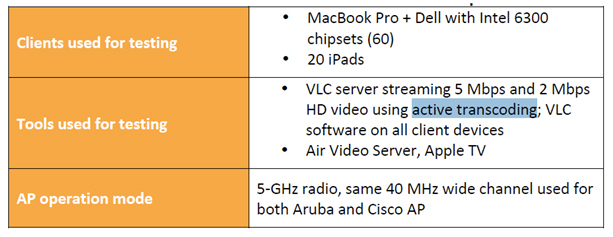
You claim to be file transfers to iPads, but don’t list them in your ‘Clients used for testing’. (continued below)

No change in video resolution for Aruba WLAN compared to Cisco WLAN

Aruba uses Active Transcoding in their tests. Cisco does not. This has the net effect of reducing the resolution of the stream for every client and is a mis-representation of the Aruba test. Cisco tackled this head on using the full resolution streams and shined. Aruba changed the parameters and represented it as the same tests. (continued below)

– it is the same exact infrastructure, testbed. Again no reason to. Enabling and disabling RF scanning, IDS, spectrum/CleanAir does not make any difference for either vendors.

I’d love to tackle this first hand. In the interest of full-disclosure, I have an AP-135 and attempted to enable spectrum analysis, but was unable to since at the time it wasn’t supported in ‘Instant’ configuration. I look forward to seeing this development come to market unless of course you want to get me an Aruba 200 controller (and licenses) to play with. 🙂 If it doesn’t impact the performance of the tests, turn them on and prove it to us (continued below)!

Aruba TMEs ran those tests for weeks. We should talk about “maximizing airtime” in another opportunity – Aruba’s RF engineering focuses on this topic nowadays than ever. For instance, a test for you to consider running on Cisco WLAN… start with 5 smartphones on 11n 2.4GHz radio. Record TCP download throughput. Repeat with 10, 15, 20 smartphones. Then add TCP upload traffic into the mix and record total throughput. Results are interesting.

Would love to discuss this more, but as you pointed out, we should tackle that in a separate thread – this is getting long winded as it is! 🙂

Miercom = independent… really? Cisco TMEs run these tests in their labs, publish it on the website URL that you shared and it just happens that a separate set of engineers who work for Miercom happened to run the same set of tests – not less or more – and come up with exactly the same set of test results. Independently. Without being paid any consulting fees by Cisco. Really? :) I firmly believe that something like Network World Clear Choice test reports are independent – and I cannot see how Miercom follows the same model.

(this is the continuation you were looking for) The reason I suggest a Miercom report instead of publishing ‘internal Aruha test results’ is that Arubas tests seem fraught with inconsistencies and, in my book, this calls into question the validity of their test process and results. Put another way, how can we be sure your data is accurate if you’re testing iPads without listing them as clients and pulling shady transcoding  shenanigans, calling it the same as full-resolution media streams. Is that an extreme opinion? Perhaps, but independent reporting should clean up those rough edges and level the playing field.

NSA podcast show is a great idea! Let’s do it. I will email Blake.

ps. Happy to chat about ISRs and ISE more down the road!

Deal on both fronts! Looking forward to visiting Aruba during Wireless Tech Field Day 3!

-Sam

Post Script:

Several folks have either outright asked offline or insinuated a handful of statements about this thread which I’d like to address:

You’re just flanning the flames for readership to make money. I do not monitize my blog with ads. I do not make revenue from it in any way shape or form and pay for it out of my own pocket.

You’re being spoon-fed responses by Cisco. I am not. My blog is mine and mine alone. My thoughts are my own and (with the exception below) are not generated by anyone else. If I get data from other sources, I will do my best to list those sources clearly.

You work for a Cisco reseller and have ‘the inside scoop’ which sways your opinions. Well, yes. I do indeed work for one of the largest Cisco resellers in the US. This does give me insight and access to hardware that others may not have and since it does, I do consider myself ‘up on the solution’. My employer does not endorse or influence my blog with the exception of discussing NDA information. I am bound by my employer to not discuss NDA information outside of the scope of the agreement and I continue to abide by that.

Aruba wants you to stop buying the AP134-135. Round 2.

Aruba recently posted a rather snarky post about the technological shortsightedness and irrelevance of 802.11ac upgradability of todays wireless infrastructures. This original post (mirrored here) admittedly ruffled my feathers on several fronts so I wrote this response. If you haven’t read these, I encourage you to go do that now.

Aruba product marketing manager, Ozer (@ozwifi) replied to my reply. Before we get to the meat of this post, in the interest of full-disclosure, this post has no direct ties to the Wireless Tech Field day events hosted by Gestalt IT. I have been selected as a delegate for the upcoming Wireless Tech Field Day event that Aruba (among others) has sponsored in the past. As a Tech Field Day delegate I have been given access to hardware and solutions from the event sponsors to utilize as I see fit. At the time of this writing, Aruba is not currently listed as a sponsor of the WFD3 event, but we certainly welcome them and look forward to their involvement!

Ding Ding!

Hey Sam,

It is @ozwifi here. It is not uncommon that we get on each other’s nerves in the Wi-Fi industry and by the tone of your reply I am guessing that’s exactly what we did. But you gotta admit, there are no personal attacks in the blog entry since it is delivering an educated technical opinion.

Oz! Good to hear from you. I apologize for the rather public response to your post, but this seemed the fairest way to address this in its entirety. To the audience at large, I apologize for the broken up, threaded reply and will do my best to make it as cohesive as possible. You are indeed correct that it’s not uncommon to get on each others nerves and you are spot on that this one hit home for me. Perhaps I shouldn’t be so personally vested in industry vision, but I’m sure it’s one of many faults that I have. 🙂  You are correct that there are no personal attacks in the Aruba post and I hope that no one believes that my reply was somehow a personal attack on the Aruba team – infact the only team I mentioned explicitly was the executive team and I certainly don’t hope they *actually* jump off the top of the tallest building in San Jose. That would not be pretty or professional and was merely a ‘leaping’ analogy. Regarding the blog post being an ‘educated technical opinion’, I do take exception to this being an educated technical opinion. It doesn’t sound educated whatsoever and I think that Aruba’s shortsightedness regarding 802.11ac is rampant in the article. Also, I’m still interested in just what the heck a 2400 is…

Poking fun at Aruba’s #1 competitor in the WLAN space with a bit of humour. You have to meet with the author, Scott, during the next WFD – he is not that bad of a person as you might think. So there is really not much to be ashamed of since we are not proposing the kidnapping of new born puppies.

Indeed I look forward to meeting him in person and we look forward to Aruba participating in another lively discussion this year! Also for the record, I wholeheartedly disagree with kidnapping new born puppies.

Before we talk tech – please leave your comments on our website.

I did indeed leave exactly my reply on the Aruba website and as of now, the post has not been approved and is not present in your comments section. To contrast, your post to my replies section was almost immediately approved. I welcome the conversation and look forward to Aruba being more transparent about their comments in the future.

First we do not have many people leaving comments, so we can use some. Second we are not that evil – look at our YouTube channel… anyone can say whatever they want. Unless it is personal attacks of course, cause that’s just not cool.

Alright, let’s talk tech.

Here is where Aruba stands:
1. We believe that dedicated AP hardware is going to provide the best coverage & capacity. Best antenna choices, speeds & feeds optimized for 11ac. If it was such a great thing to install modules on an AP in terms of either of these two, many WLAN vendors including us would have jumped on the bandwagon.

There will always be advances in technology and I believe that most any new solution will ultimately outperform legacy solutions. We see this time and again in the industry and this is a byproduct of Moore’s law. The 802.11ac module is about investment protection. The message from Aruba is clear: either a) don’t buy a 3SS  AP today and wait till the 802.11ac AP comes out in the future or b) buy two Access Points (3SS today and 802.11ac tomorrow). Cisco has an option that addresses this concern head on. Aruba does not.

2. Since we are a WLAN company, you will not be too far off in assuming that we will an 11ac AP available down the road. That’s a given. I cannot tell you when, what, how since the info is still very much confidential and shared under NDA.

Of course! This adherence to an NDA is critical in our industry and competitive speculation beyond NDA is what Aruba is good at. This is FUD until you can empirically prove otherwise (more on this later).

3. We are obviously not going to stop promoting AP-130 series product line. We educate our customers regarding the benefits of first gen 11ac and second gen 11ac all day everyday. We do not hide information or try to corner them into buying 130 series. That will be very wrong. Upgrading to dedicated 11ac AP from Aruba 11n will require same process that folks are used to performing during the last 10 years – climb the ladder, plug out AP, plug in AP. As opposed to Cisco, we are not proposing a change in this process. There are no hidden costs here.

I have every expectation that Cisco will not only have a dedicated 1-st gen 802.11ac Access Point in the future, but will also have a 2nd gen and whatever comes after that. The market is always evolving. Cisco’s message today is that the price of two Access Points from Aruba is more than the 3600 + a 1st gen 802.11ac module. Again, investment protection. The costs that Cisco is addressing with this module are not hidden. They are outright and Cisco is head-on tackling this proactively. Aruba is behind the 8-ball and does not offer investment protection. If I were an Aruba customer, I’d not buy new Access Points today because there is no low-cost upgrade path to 802.11ac in the future. Either that or write your check out to ‘Aruba Catalog of Compromise’. ‘Aruba Catalog of Shortsightedness’? ‘Aruba Catalog of Technical Irrelevance’? ‘Aruba Catalog of FUD’? I don’t know – pick one, they all work for me.

Here are my comments on your responses for what they are worth. I am guessing that we will agree to disagree at the end of it… although I hope I can provide more color commentary and that you will find them useful. Again, I am trying to talk tech here not disagreeing with the fact that 3600 11ac module is good marketing.

Oz, I 100% agree with everything you said here and am speechless that we’re so in sync! 🙂

1250 series: Folks invested in the platform found out later that there was no need for this modular AP since moving from draft 2.0 of the standard to the ratified version did not require an hardware upgrade.

We see this time and again with the Cisco product lineup. The radio modularity in the 1220s was upgrade investment protection for 802.11G. The radio modularity in the 1252s was upgrade investment protection for 802.11n. The radio modularity in the 3600 is upgrade investment protection for 802.11ac. There is a trend here.

Cisco’s predictions were wrong.

No, infact Cisco’s predictions were right! They took a ‘best guess’ at the hardware that it would take to support the finally ratified specification and there was never a module released because it was never needed. No hardware changes required was a win-win for Cisco customers.

It was a 5-pound AP

Auxiliary boat anchor, yes. It was heavy. Don’t beat up on it because it was big-boned. It needed that modularity. It’s mommy told it so.

with no dual-radio support 802.3af (if you rememeber, Cisco was claiming at the time that 11n APs will not be able to support 802.3af).

Unfortunately, you’re wrong here. The 1252 does indeed support 802.11n on both radios utilizing 802.3af. Quit spreading flat out lies.

I believe that 1250 series was mostly about marketing, capturing attention and not so much about delivering best of breed Wi-Fi technology. Given that the product line lived only about a year, on this side of the fence we think that our predictions about those first generation of 11n APs were the right ones.

1 year, huh? I show final date of support for the 1252 as early 2017. My memory isn’t all that clear on the 1252 launch date, but it was first supported in WLC code 4.2.61.0 which has a release date of March 21, 2011. My math is a bit fuzzy on this one, but 2011 to 2017 seems a much larger window than 1 year.

Difficult to deploy: Here is the Cisco process… Install 3600 today. Wait 8 months. Buy 11ac modules. Climb up the ladder. Unscrew the mounting bracket. Take the AP down. Install module. Climb up the ladder. Screw back the mounting bracket.

The vast majority of the installations I see are ‘snap in’ mount. I don’t recall how the Aruba 130 mount bracket works, but palming the butt of an AP to snap it out of place and snapping a module in seems pretty straightforward to me.

Cisco *will* come up with their dedicated 11ac AP hardware that’s based on Marvell chipset, as opposed Broadcom running inside the 11ac module for the 3600.

I do not have technical documentation about the chipset in the 802.11ac module from Cisco. This would be the first time Cisco has used Broadcom in an infrastructure device and would certainly be a departure from their M.O. Having said that, if you have NDA insight into the hardware diagram and working structure of the AP, I believe this would be covered by NDA and subject to change. Either way, you’re speculating or sharing data that is NDA and is subject to change. We’ll have to agree to disagree until the module comes out and we can take it apart and do performance testing with it.

With that upgrade, that’s three trips to the ceiling. And when the 2nd gen 11ac AP comes out, you do it again. That’s four. We cannot call this simple as opposed to difficult.

I still have 1252s in place today. They service a need for many of my customers that simply need to support 802.11n. I foresee that the 802.11ac module will support 1st gen 802.11ac needs for a long time. Aruba has no products today that can be purchased and upgraded later. Again, upgrade investment protection.

CPU speeds: Here is the thought process. Aruba AP-135 beats Cisco 3600 in peak performance. Whether it is pure 3×3:3 MIMO laptops, UDP or TCP traffic flows, or a mix of smartphones, tablets, laptops… that’s what we see using Cisco release 7.2 and Aruba release 6.1.3.2. Aruba product managers prefer not to use AP-135 CPU and memory subsystems for an 11ac AP per our interviews in order to be able to deliver the best peak 11ac performance. This tells me that Cisco product managers have to think the same way since AP-135 outperforms Cisco 3600. Using your argument, although looking at it from a different angle, how can we be sure that Cisco 3600 plus an 11ac module will deliver greater performance than a dedicated 11ac AP hardware?

We can’t until it’s out and available. Regarding your other performance claims, I welcome those head-on and would encourage readers to visit ciscobeatsarubayetagain.com. Aruba has addressed these performance tests inconclusively (performing iPad throughput tests with Android devices, transcoding their video down to lower bit rates, and disabling recommended enterprise feature sets such as spectrum analysis and IDS). When will we see Aruba engage a 3rd party like Miercom to do independently validated performance tests instead of continuing to poke and prod at Cisco? Let’s back your claims up independently. As an aside, I welcome the performance claims of existing hardware but it’s off-topic for this thread.

Inconsistent RF and feature set: 3600 will run two separate Wi-Fi chipsets from two different vendors: Broadcom and Marvell. Why on earth would I want to do this if I want uniform features and functionality across my 2.4GHz and 5GHz radios? No AP that was built for enterprise WLANs ever had this design. I am sure there was a good reason behind it.

Adressed above.

Upgrades: Cisco 3600 requires 7.2 release, which requires latest generation of Cisco controllers and NCS management instead of WCS management. We are just making it more apparent for those who care, although Cisco release notes clearly state these facts as well. The tradition of having to upgrade something in your network whenever there is a new WLAN product or solution from Cisco is really what gets on our nerves. For instance ISE… BYOD solution that requires me to upgrade from ISR to ISR G2… why would I want to touch my branch router if there is an employee owned iPad connecting to my network? Some of this stuff just does not make sense to us and we have just watched this episode way too many times … hence it is a reflex motion… we do not miss an opportunity to remind folks of what they need to be careful about.

I’d like to hear more about your ISR concerns. I’m not sure where the mindset of routers being upgraded to support your iPad comes from. The iPad is not a wired device. Are you referring to the AP801/802 module? Both of those are integrated into the ISR and fully supported in 7.2 code. If you have a switch that supports ISE, there is no need to replace the router between the switch and the Access Point. Although, I always liked the idea of cabling my iPad to my ISR router…

Alright my apologies for the long comment post, tried to do my best to keep it short. I hope you can give me a chance to respond by accepting my comments.

Your comments are always welcome (despite being shunned on the Aruba post comments) and I apologize again for the threaded response. If you’ve read this far, I formally invite Oz (and Scott for that matter) to come onto the No Strings Attached Show and discuss Arubas stance on 802.11ac. I look forward with taking more about this in a forum more conducive to back and forth dialogue.

See you at WFD3.

 I as well as the entire WFD3 delegate team most certainly look forward to Arubas participation. I recall last year being lively and look forward to it!

-Sam

Aruba wants you to stop buying the AP-134 and AP-135. Offers no alternative.

Every once and a while, I stumble across articles that make no sense, are poorly worded or constructed, or flat out wrong. Last week, I ran across one such article that was so out of left field that I felt compelled to address it directly here in my own words. The article is over on the Aruba Networks official blog site (presuming it’s still up). Take a moment, head on over and give it a read (article preserved here for posterity). I was so flabbergasted by the article and its combination of FUD and flat out incorrect information that I used the ‘leave a comment’ link on the bottom. Once I did that, it dawned on me that my comments would likely never get posted – I then realized that I have my own forum to respond to this in, so the next portion of this blog post is the comments I left (with a few typographical and edits to make it flow):

Begin reply post

Wow – there is so much FUD in this article, it’s laughable.

Regarding the 1252 comment:

Remember the Cisco 1250 access point? This pre-standard AP offered future-proofing with an upgradable 802.11n radio meeting the ratified standard. It didn’t work out as it was costly and difficult to upgrade, and didn’t meet the promised performance benefits. 

This is flat out untrue. It ‘didn’t work out’ because it didn’t *need* to work out. The 802.11n pre standard was rolled into the final 802.11n spec. This (upgradability) was only there to ensure users that, in the event the specification was not implementable in the 1252 hardware, that they had an option to field upgrade the units. The performance was on par with other first generation 802.11n products and the 1252 was the wifi alliance test bed for compatibility – it was basically *the* reference 802.11n platform for a very long time.

Difficult to deploy: The 3600 11ac module must plug into the base of the access point, exactly where the mounting brackets are located. This means users will need to remove a deployed AP from operation. This is not a simple plug-in but more akin to opening your laptop for a RAM upgrade. 

Have you actually *seen* the 802.11ac module or a 3600? There is a piece of tape on the back of the AP and two thumb screws. This is more like replacing the battery in your laptop instead of opening it up for a RAM upgrade. This upgrade also will not compromise the thermal venting that is required in lesser manufactures Access Points since the main unit remains sealed.

Lack of promised performance: The IEEE 802.11ac standard promises increased performance over 11n technologies, but the 3600 11ac module’s throughput is dependent on its two-year old processor and RAM, which only scales to 11n rates. This means that although you will be able to connect with newer 11ac clients, there will be questionable increase in performance by doing so. Why spend money for increased performance when you won’t notice it? 

Really? You’ve done performance testing to empirically validate your claims? No? I didn’t think so. Cisco knew well in advance that 802.11ac was coming and the CPU and memory in the 3600 is significantly greater than in the 3500 – specifically for this reason. Until you can show us numbers to back up your vapor-stats you have no evidence that the CPU/memory subsystems of the AP will hinder its performance.

Constrained RF: The 3600 11ac module has its own antennas, and since Wi-Fi rates depend a great deal on antenna design, shoe-horning antennas into the small space of the module will yield less than optimal performance to clients. The result will be your 11ac clients will connect to stronger RF signals from 11n radios. 

Have you discussed the RF design characteristics of this module? Do you know how it will integrate with, instead of replace or work against, the (integrated) 802.11n radio? You assume this will be a discreet radio operating independently of the 802.11n radio. Don’t assume – know. Once you can declare the design is somehow faulty and back it up with block diagrams from Cisco on how the module will (or won’t) interoperate with the host AP, you’re basically guessing and spreading FUD.

Inconsistent feature set: The 3600 11ac module will use a new, untried chipset that may be incompatible with existing Cisco WLAN controller code. So if you add the 11ac module, you have the same hardware, but different features. That will lead to a management challenges and increased operational expense. 

The mindset of ‘don’t move because it’s a new chipset’ or ‘it may require new code’ is a completely invalid conversation. When Aruba releases its 802.11ac AP don’t you expect it to be a) a new chipset or b) to require new code? This is going to happen for every infrastructure manufacturer – Aruba included.

More upgrades coming: The 3600 AP itself requires you have the latest 5500 series or WiSM2 controllers as well as NCS management. So if you have older 2400, 4000, WiSM or WCS, it is that time to write your Cisco tax check again. Make it out to, “Cisco Catalog of Compromise”. And consider this- the 3600 11ac module is pre- standard and will not meet promised performance increases, so you will likely be replacing those 3600 APs at some point in the near future. 

You position the requirements for the 3600 as having a very narrow list of supported controllers (which is misleading) – it is also supported on the 7500 controller, the 2504 controller and the SRE controller. Are you telling me that every modern Aruba AP is supported on every past Aruba controller? At some point you have to lifecycle manage your gear – even Aruba. I don’t even know what a 2400 is.

All told, the expectation of having a Cisco 3600 AP + module will a) give you better performance today with 3 spatial streams and the cost of the module plus the 3600 will be far less expensive than purchasing an Aruba 3 SS AP today and replacing it with an Aruba 802.11ac AP tomorrow. There is no upgrade assurance with the Aruba. The message is loud and clear – if you’re an Aruba customer, do *not* purchase the AP-135. You will end up needing to forklift it out when you move to 802.11ac next year. Buy a Cisco 3600 + 802.11ac module and you’ll have spent far less money than buying two Aruba Access Points (1 now, 1 later).

-Sam

End reply post

Now, I realize it’s laughable to infer that Aruba is advocating you not purchasing their flagship Access Points and it’s a leap assume that since Aruba has no upgrade investment protection that this means that you should stick with your old Aruba equipment, but this leap is a small step – more akin to jumping off of the bottom step of your stairs to the ground floor. The leaps that Aruba makes regarding 802.11ac and the module from Cisco are more akin to Arubas entire executive team finding the tallest building in San Jose and jumping off it all the while waving their fists in the general direction of Tasman Drive. Shame on Aruba for not fact checking their article. Shame on Aruba for spreading FUD. Shame on Aruba for picking a fight with baseless facts and accusations – declaring facts about a product that they’ve not even laid hands on.

-Sam

Filtrete WiFi Thermostat

Much to my wifes chagrin, I recently purchased yet another thermostat for the home. Our house came with a pretty standard analog style thermostat originally, and after wanting something a tad more ‘tech friendly’, I previously opted for a Home Depot purchased Honeywell touch screen unit. This worked well, but when I discovered the WiFi enabled thermostat from 3M Filtrete, I had to replace it. This was my second foray into thermostat work for the home so I was feeling pretty confident overall in my ability to replace my home unit for the second time.

Please note that I am not an electrician and if you do electrical work incorrectly or disregard any packaging warnings or instructions, you can seriously damage your home HVAC equipment, generally cause electrical home mayhem including tripping circuit breakers and blowing fuses, or cause bodily harm – including death. Do not attempt this unless you’re a savvy electrical type of person and always follow the included safety advice of the product. I recommend you starting this project early in day. In the event you screw something up, you want a window of time during the day that an electrician can help you out!

Now that’s out of the way, you could understand my interest in tying my thermostat into my home wireless network. 1) it’s cool (no pun intended) and 2) think of the possibilities! As it turns out, 3M Filtrete have a relationship with the folks over at RADIO THERMOSTAT to provide the cloud based services to control your home climate from any Internet enabled device – including your phone! After a quick check of the wireless device capabilities and a confirmation that it does indeed support WPA2/AES encryption (albeit PSK only), it was a quick trip to the local Home Depot to pick one up! Those of you out of range of a local Home Depot can conveniently have one shipped to you if you’re interested. The packaging was a pretty traditional ‘hard to open’ plastic clamshell that required some cutting and cajoling to get open:

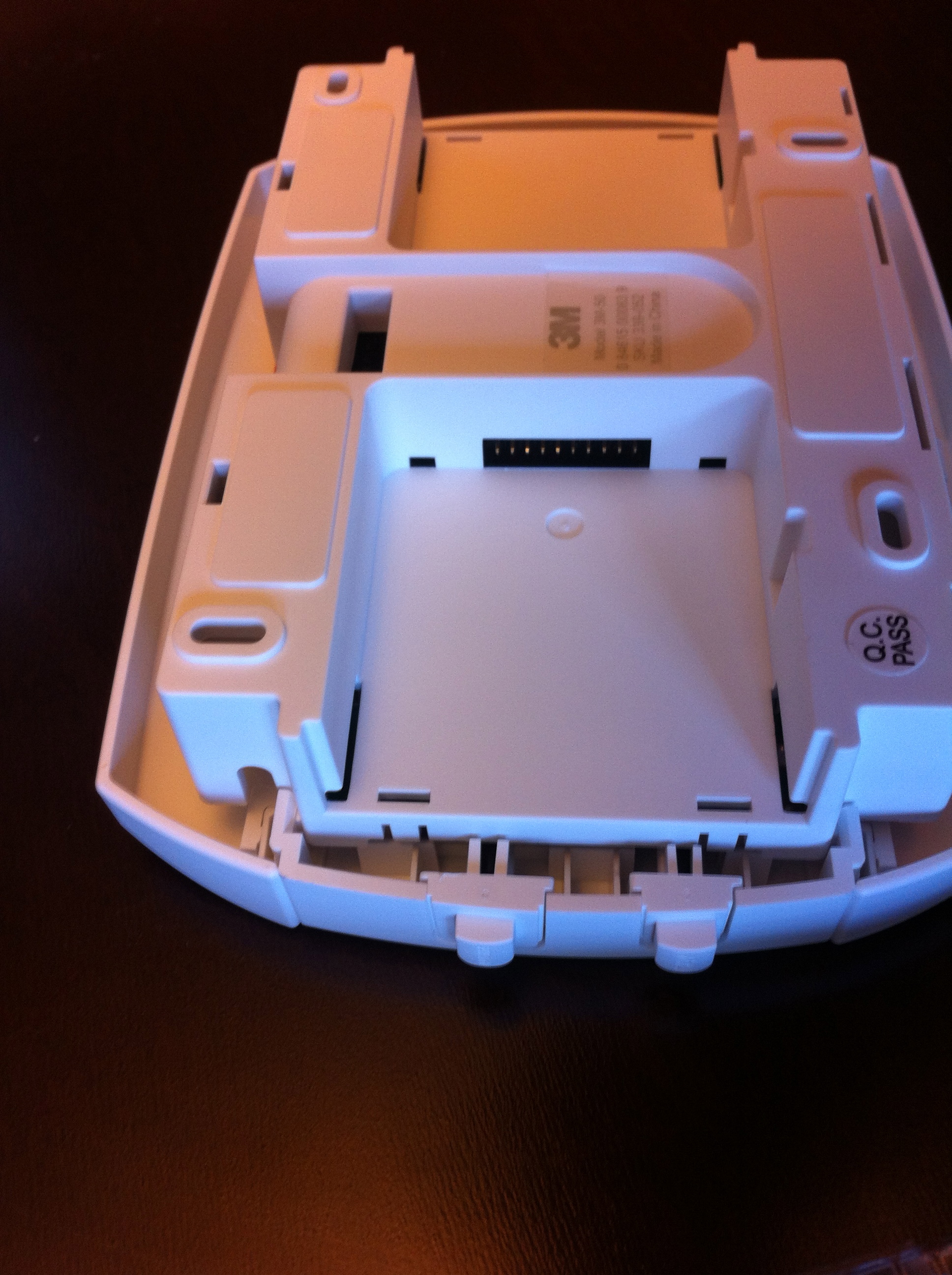
After some separation of the various bits and pieces, I got a good look at the back of the thermostat which is where the radio module gets installed. This is a ‘standard’ thermostat that has two UNSAP (Utility Smart Network Access Port) radio module slots on the back of it and the WiFi module is actually a separate modular piece:

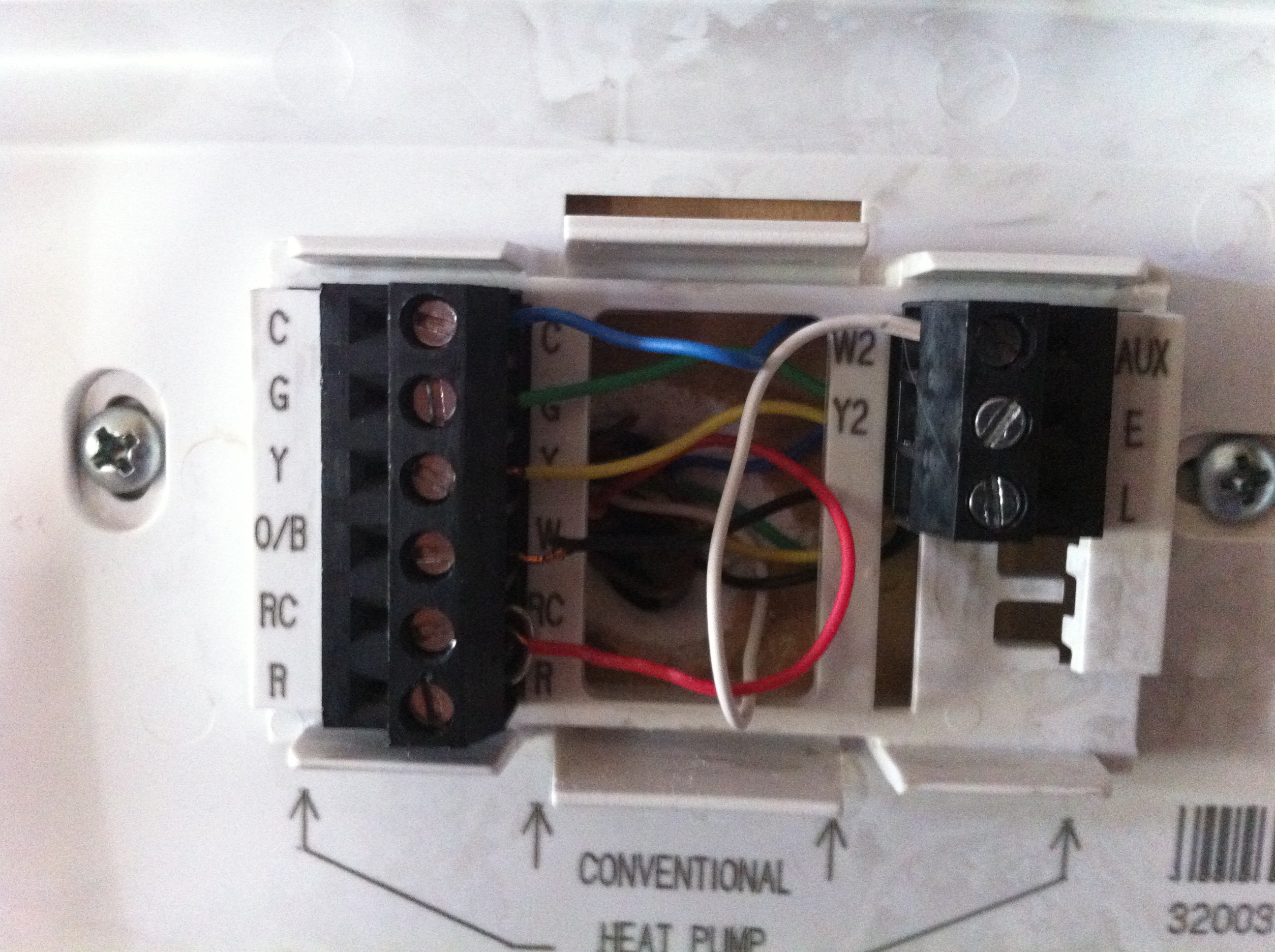
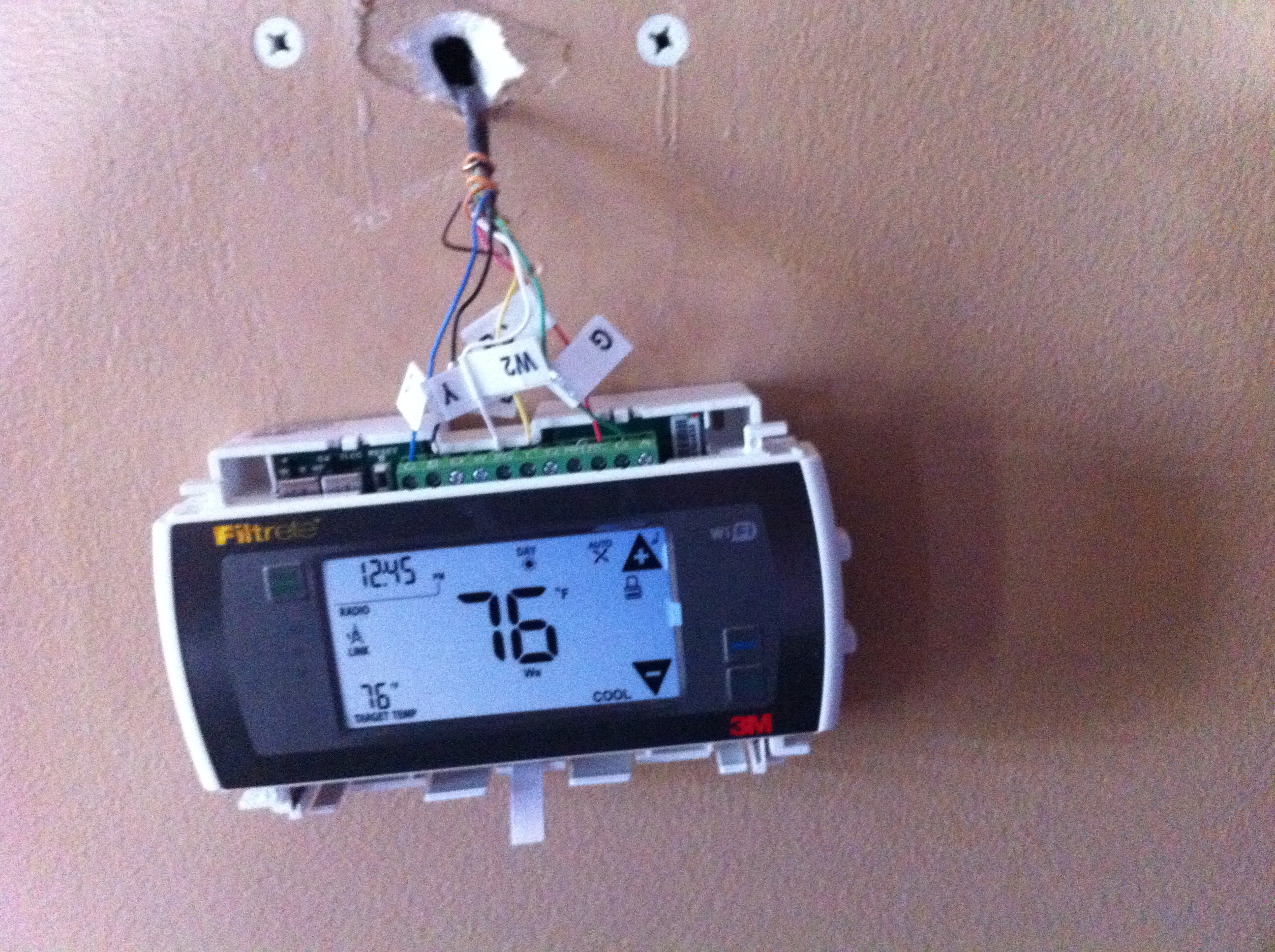
After digging into the installation directions, there were a few things of significant note: 1) There are a variety of HVAC types of systems and 2) There is no formal standard for wiring them. This means you have to be very diligent about observing the existing cabling from your current thermostat. You should turn off the breaker to your existing HVAC at this point since you’ll be plugging and unplugging live wires. After confirmation that the power to your HVAC is off, you will have to open up your existing thermostat and observe the markings on it to determine and label the wires correctly:

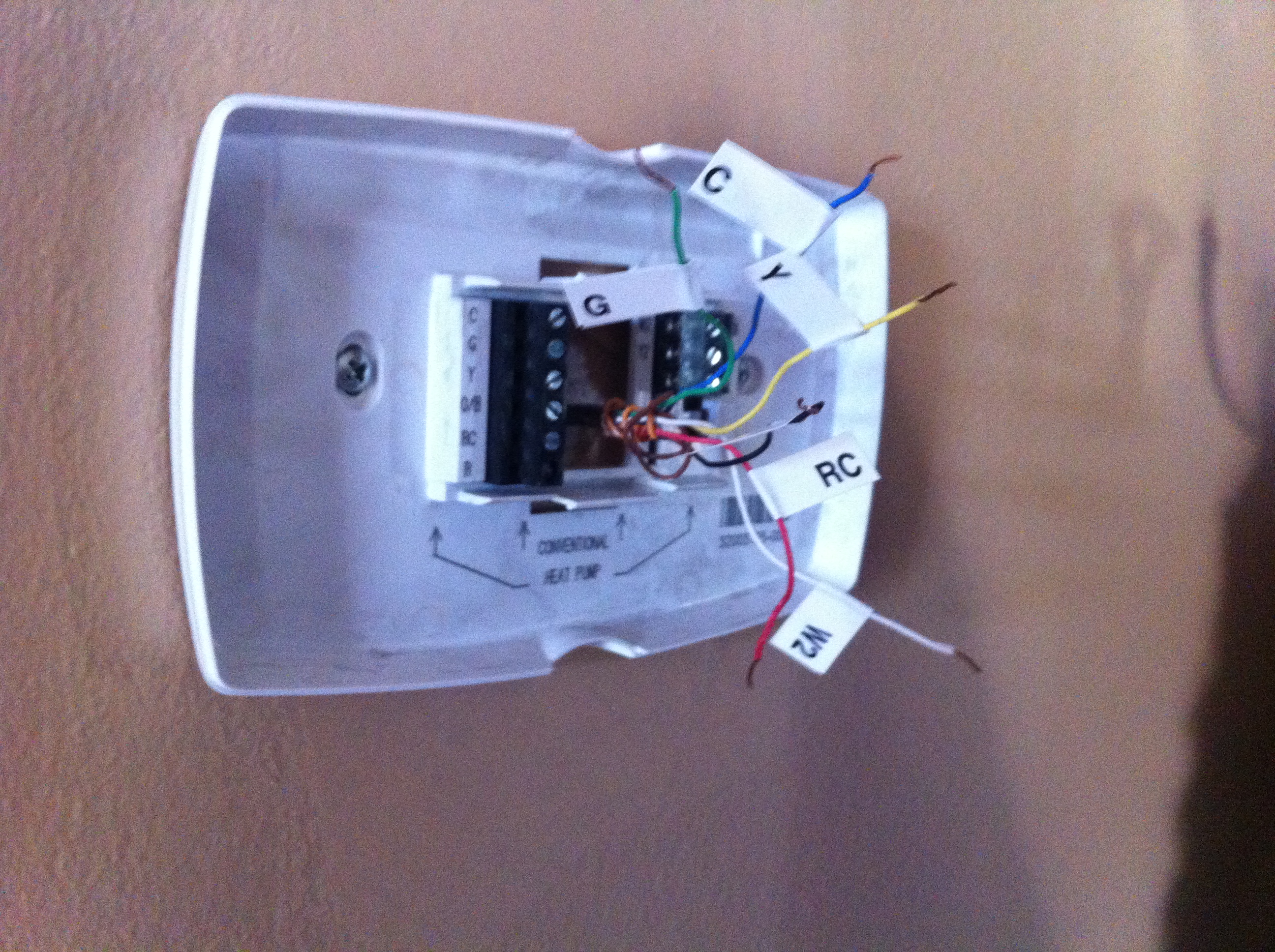
Use the included labels to match up the colors marked on your old thermostat. This is arguably the most intensive part of the whole project. You don’t want to get these wrong and I suggest you take pictures along the way as a reference point in case you have to call an electrician to help you out. Once you’ve labeled all of your existing cables, you can physically remove your old thermostat and begin attaching the new one. This is a matter of lining up your previously labeled cables with the connectors across the top of the unit:

It’s also worth noting that the power to the thermostat must be provided via the ‘C wire’ to power the WiFi radio. If you do not have a C wire, you will need to run a dedicated power source for the thermostat. At this point in the install, if you’re confident that you’ve got it all hooked up correctly, go ahead and install the radio module into the back of the unit. The power to the unit needs to be off to install the module so do it now, or wait until you flip the breakers and install batteries to test it, then turn it back off later to install the module. Wrap the cables across the top channel of the module and affix it to the wall using the included mounting hardware:

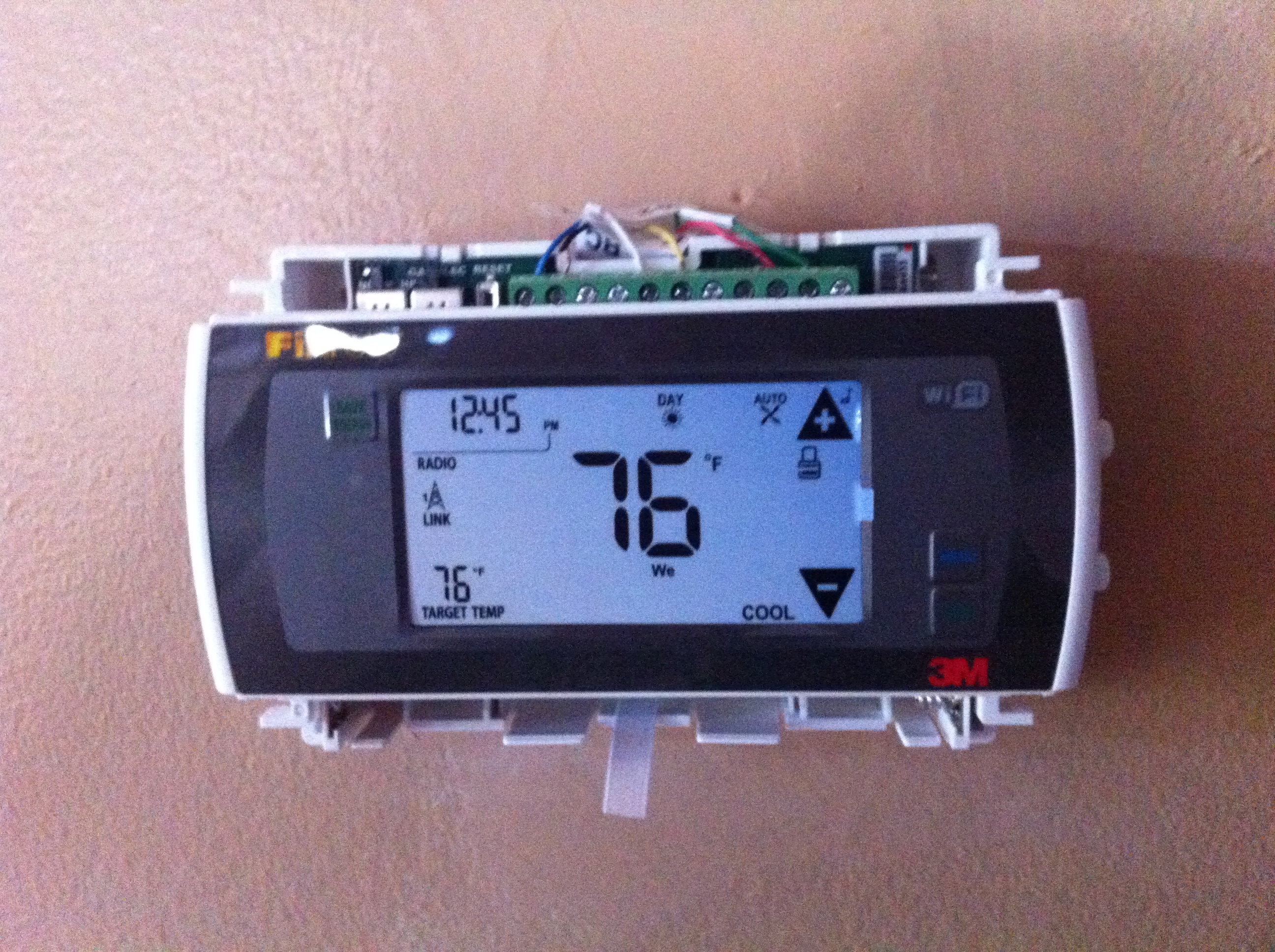
Once you remove the protective cover, install the batteries in the bottom of the unit and switch the power back on! You’ll have to run through a small setup to bring the thermostat online and before you move on with configuring the RF module, make sure your unit turns on your heater and AC by following the directions in the installation manual. Once you’ve confirmed it works, install the snap-in covers to hide the wires and batteries and move ahead to the fun part – the wireless setup!

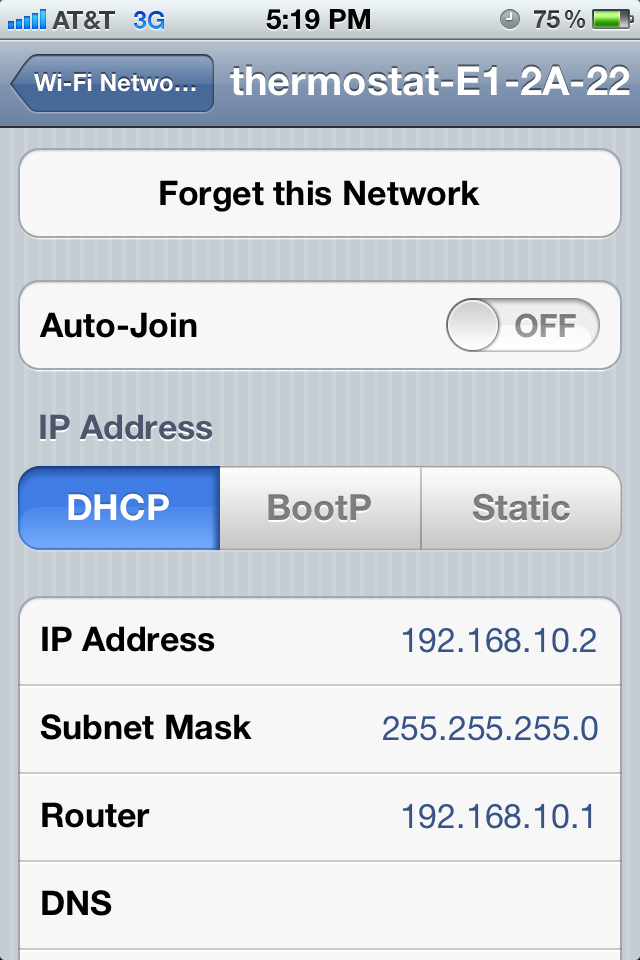
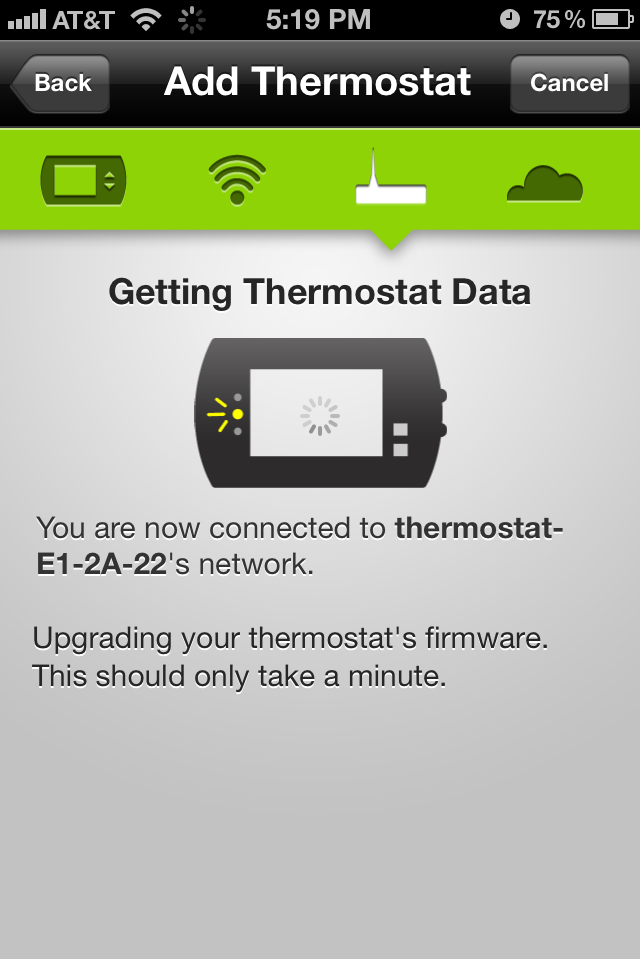
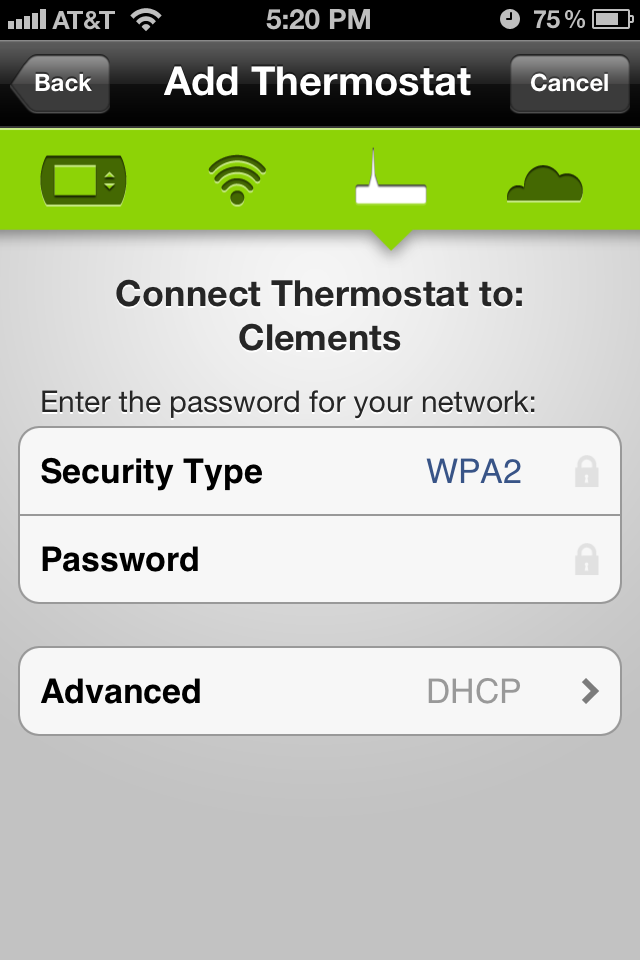
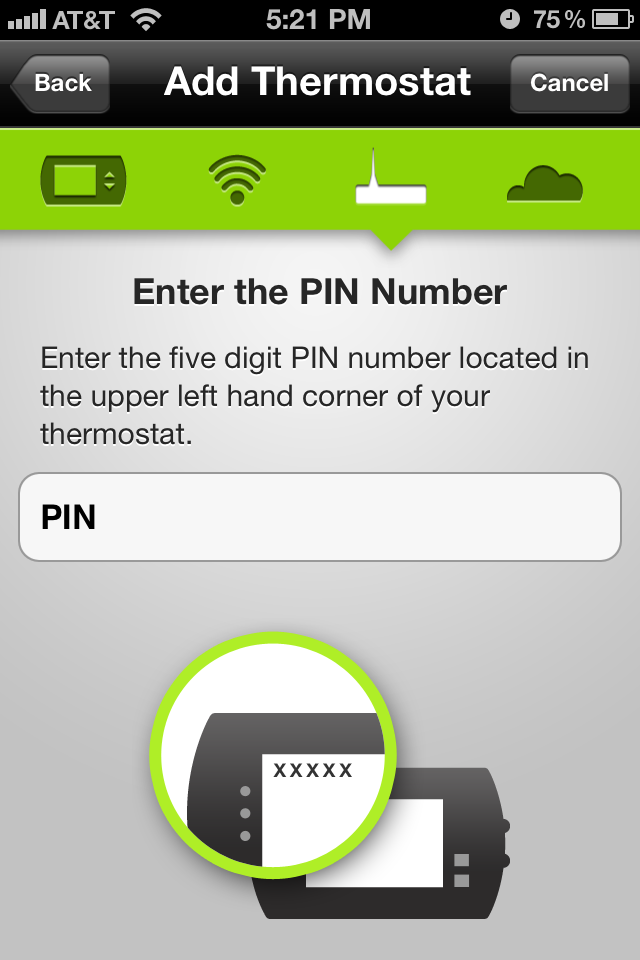
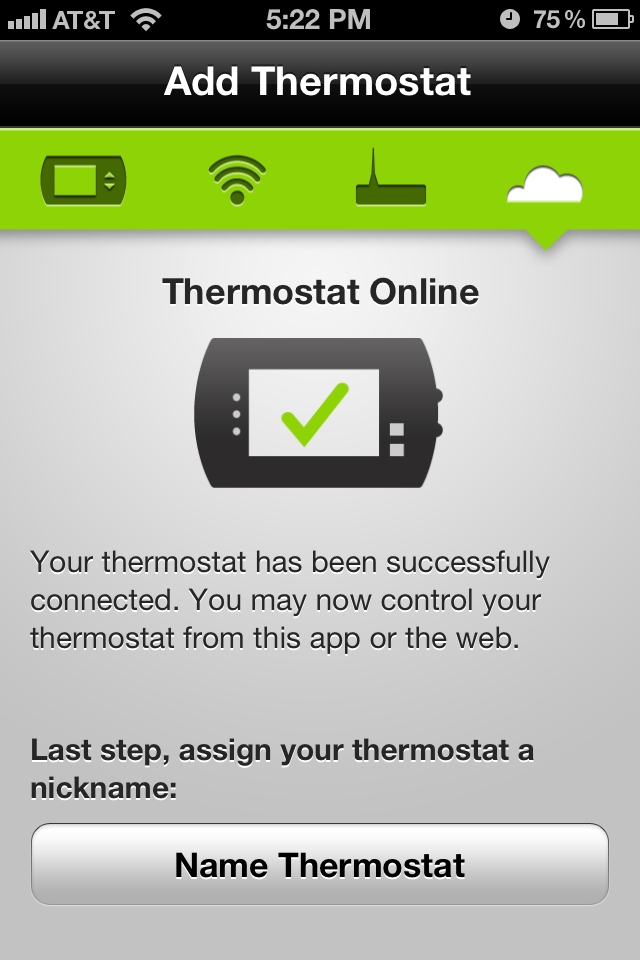
The easiest way to describe the wireless setup is that the radio comes preconfigured with it’s own SSID to attach to, it’s own DHCP server, and a PIN based authentication that is displayed on your thermostat screen. Goto the Radio Thermostat site and create yourself a user account. If you have an iPhone, download the free app from the App Store. The app prompts you to log using your Radio Thermostat credentials, then prompts you to join the SSID hosted by the thermostat (wow, there’s something I never thought I’d type!). You then switch back to the Application, configure the unit to connect to your home wireless (SSID and encryption keys), then enter the PIN displayed on the thermostat to complete the setup.

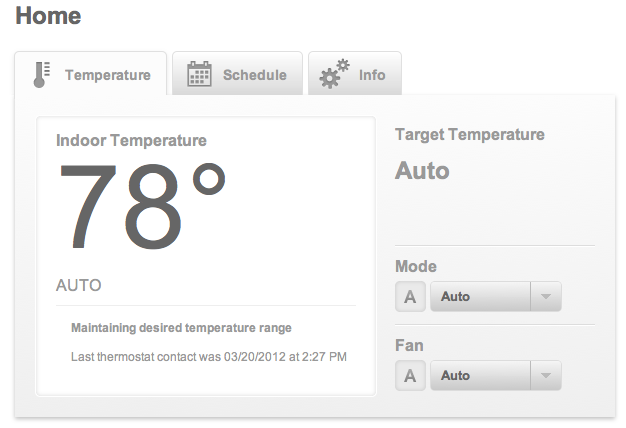
Once your thermostat is online it does all of the cool things you’d expect it to – it auto updates it’s firmware, sets the time based on NTP and your timezone and then allows you to log into the Radio Thermostat page to create your heating and cooling schedules as well as perform instant changes such as setting away from home, turning on cool/heat, turning on or off the fan, etc.

In all, the installation was fairly painless and intriguing overall. Those of you interested in the wireless capabilities of the unit, it is a 2.4GHz radio that supports 802.11b/g data rates, open SSIDs, WEP, or WPA2 security. Here is what my unit looks like from a Cisco AP:

Those of you wondering, no, the unit does not support CCX. 🙂 I’d strongly advocate anyone that’s not afraid of minor electrical work, and appreciates a good overall WiFi enabled, cloud application give this a try. The effort was very doable and those of you that are afraid of cloud controlled HVAC deployments rest well knowing that the radio module is removable. The thermostat functions as a ‘regular old thermostat’ without it and you can remove it at any time.

Cisco WLC 7.2 FUS code release

Cisco recently released version 7.2 of their Wireless LAN Controller code. Along with this update came something new for several administrators in the form of an ‘FUS’ update. This update is available for the 5500 , WiSM 2, and the Flex 7500 platforms and contains a variety of firmware specific updates for each platform including:

  • For the 5500 and WiSM2
  • Field Recovery image update
  • Bootloader updates to 1.0.16
  • Offline Field Diagnostics to version 0.9.28
  • USB Console to 2.2
  • MCU image update too 1.8 (5500 only)
  • FPGA update to 1.7 (5500 only)

For the Flex 7500 controllers, there is a RAID firmware update. There is no FUS update for the 2500 controller or any of the legacy platforms (they’re not supported in release 7.2 in general anyway). Buried in the release notes are a variety of nuggets, but it is imperative that this update be installed by itself with a reboot between it and the main 7.2 code release. The order is not important, just the fact that there is a reboot in-between. Additionally, in order for the FUS image to actually update the various components, you need to have a serial attachment to the WLC during the reboot and you must interact with the image upgrades in order for them to execute. This means that if you’re used to doing the ER updates that you just ‘apply and forget’, this is going to be a deviation from that process. To add to this, each update requires you to answer ‘yes’ in order happen but they’re not quick. You will end up burning somewhere south of about a half an hour to pull off a complete upgrade and if you happen to miss one, you’ll have to reupload the image and step through it again. Cisco is nice enough to tell us during the update approximately how long each will take and these numbers are fairly close to what I’ve experienced in the field. The tally on a 5500 is:

Upgrade Bootloader from 1.0.1 to 1.0.16

  • Erasing Flash (estimated 6 seconds)
  • Writing to Flash (estimated 41 seconds)
  • Checking Boot loader integrity (estimated 2 seconds)
  • Total: 49 seconds

Upgrading FPGA from rev 1.3 to rev 1.7

  • Upgrade takes about 75 seconds to complete

Upgrading Env from rev 1.6 to rev 1.8

  • Upgrade takes about 4 seconds to complete

Upgrading USB from rev 1.27 to rev 2.2

  • Upgrade takes about 11 seconds to complete

Upgrade OFD from version WLCNG OFD 0.8.1 to WLCNG OFD 0.9.28

  • Erasing Flash (estimated 24 seconds)
  • Writing to flash (estimated 111 seconds)
  • Total: 135 seconds

Upgrade Field Recovery Image from version 6.0.182.0 to 7.0.112.21

  • Erasing Flash (estimated 49 seconds)
  • Writing to flash (estimated 716 seconds)
  • Total: 765 seconds

Yes, you read that correctly – the Field Recovery Image takes a whopping 13 minutes to execute! Of interest to those of you that use the USB serial console built into the WLC is the fact that the USB update will flat out break your session. Once you kick off that particular update, you should suspend you session and wait for it to complete. The kicker of course is that you won’t know since you don’t have a console session. The lesson here is that while it is possible to perform these updates using the USB console, you’ll not regret preferring the good old fashioned RJ-45 console cable method.

If you happen to miss an update and have to reapply the image, you’ll notice that the FUS image will proactively check to see if the updates have been applied already:

====================

Checking for Bootloader upgrade

Bootloader upgrade …

Bootloader 1.0.16 is up to date.

====================

Checking for FPGA upgrade

FPGA upgrade …

FPGA image is up to date

It will perform this check for all components, but when it gets to the Field Recovery Image, it will actually ask you if you want to re-apply it:

Field Recovery Image upgrade …

        Field recovery image Current version 7.0.112.21 is up-to-date.

        Answer “y” below will force upgrade to run again.

        Are you sure you want to proceed (y/N) ? n

Again, note that if you re-apply this particular update, you’re in for a thrilling 13 minutes of ‘edge of your seat’ thrills while it completes. There is no way to cancel it and as you’re warned numerous times throughout the FUS process in bad english:

      * Lost POWER will completely kill this unit and not recoverable. *

      * There may be multiple reboot. Please let the program run.      *

Once you’ve completed your updates, and you’re observing the production image boot, it will verbosely tell you what the version of all of these components are so you can tell that they’ve been successfully applied or not:

Cisco AireOS Version 7.2.103.0

Firmware Version FPGA 1.7, Env 1.6, USB console 2.2

Initializing OS Services: ok

Applying these updates is important and does resolve a variety of issues so it is recommended to go through whatever outage window you’re going to require to apply them or you may want to consider pulling a spare (+1) controller out of service, upgrading it and moving all of your Access Points over to free up your primary for upgrade. Either way, you should do this – just make sure the updates actually apply!